How to Start a Project
The Cornell Center for Advanced Computing (CAC) operates on a cost-recovery model.
CAC services – including computing, consulting, file storage, backups, and/or cluster maintenance – are
fee-based and require a Cornell University account number for charge-back based
on
rates (rate information available only to Cornell faculty, staff, and students)
which are subsidized by the Provost and
revised annually. Exploratory accounts, general
help, documentation, occasional questions, training workshops, and access to research networks
continue to be provided at no cost.
For all CAC Project forms, authenticate using your CUnetID or CWID account to logon.
»
Project Requests
To access CAC's fee-based services, first establish a project with CAC, specifying the following four roles:
• CAC Project PI - The lead on the project, the person who can authorize billing and designate team members.
• CAC Project Proxy - Can represent the PI in all ways related to the project.
• CAC Project Account Contact - The person who handles billing in your department.
• CAC Project Project Member - Can use the compute resources allocated to the project.
- The PI first completes a Project Request Form. Only faculty
and research staff may complete a Project Request Form; students need to identify a faculty sponsor to serve as the PI.
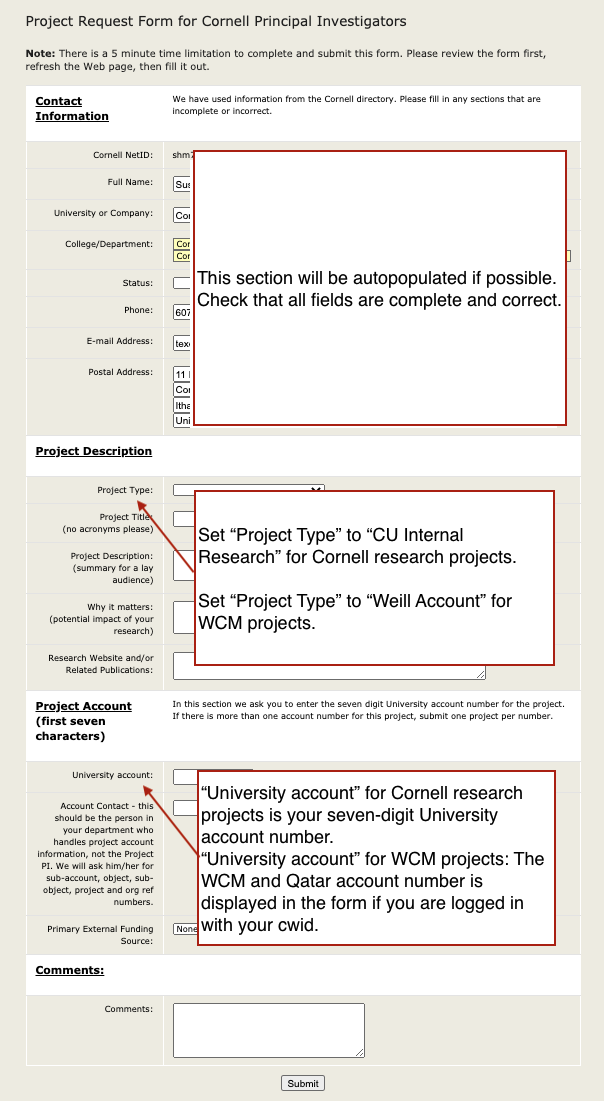
A Cornell University account number and account point of contact is necessary to complete
the form. Details:
Click image for larger view in new browser tab
|
- Contact Information:
• Complete all fields in this section after
- Project Description:
• Complete all fields in this section
• Set Project Type to
‐ CU Internal Research for Cornell research projects
‐ Weill Account for WCM projects
- Project Account:
• Complete all fields in this section
• Set University Account to
‐ Your seven-digit University account number for Cornell research projects
‐ Your WCM or Qatar account number; these are displayed in the form if you are logged in with your CWID.
• The Account Contact should be the person in your department who handles account information.
|
- Submitting the form triggers an email to the Account Contact specified, with a link requesting additional account information.
This form must be completed and submitted. Required information includes contact information for the Account Contact,
an account expiration date and the SAP into OrgRefID or Note section.
- Within an hour after the Account Contact completes the form, The PI will get an email saying that the project has been established.
»
Managing Your Project After it is Established
After a project is established, the PI can use the Manage Projects Form
at any time. Please note: only the PI or Proxy can use the Manage Projects Form.
The form is used to view current settings, add or remove Project Members, and request
CAC services such Red Cloud, disk space for file storage, or cluster
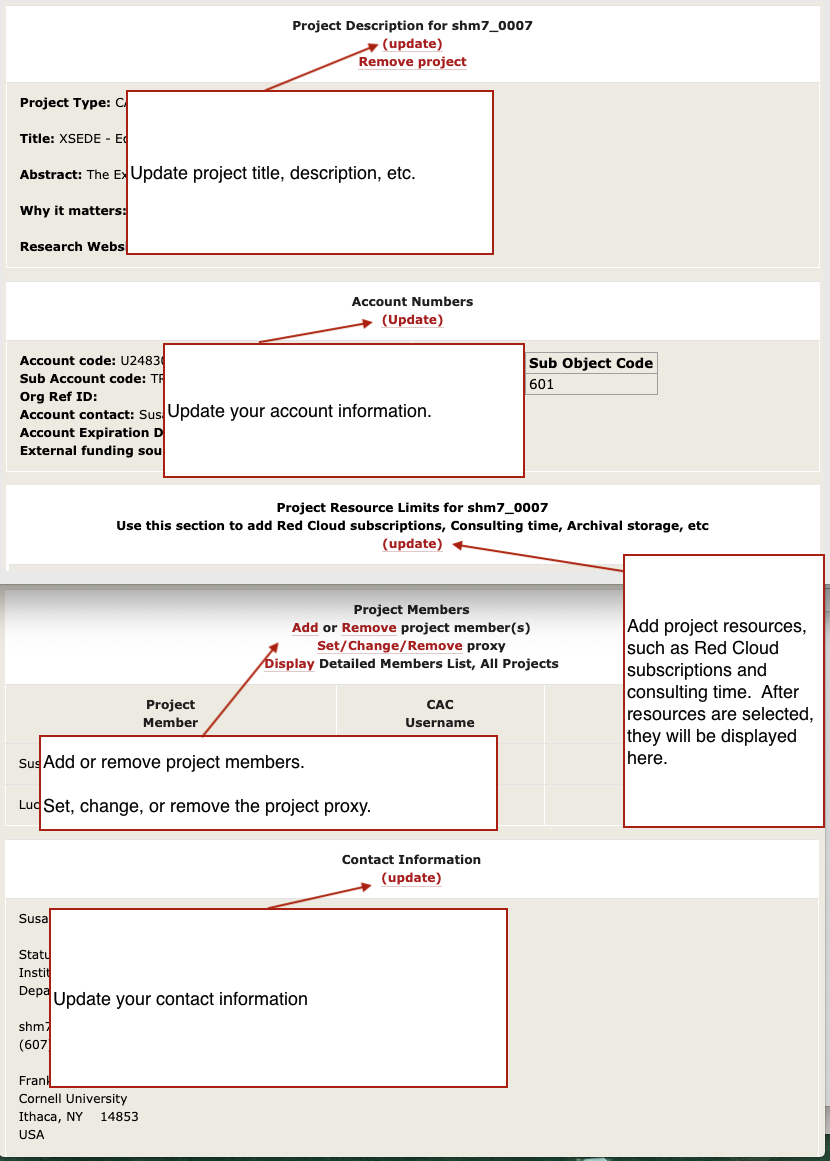
maintenance for your research group's cluster, or specify consulting support time. Specifically, you can:
Click image for larger view in new browser tab
|
- In the "Project Description" section, you can update the project title and abstract
- In the "Account Numbers" section, you can update account numbers, the Account Contact, and the expiration date
- In the "Project Resource Limits" section, you can specify consulting hours, private cluster maintenance, file storage, and Red Cloud subscriptions
- In the "Project Members" section, you can Add or Remove Project Members. Note that the form to Add Project Members includes information on an alternate
procedure to add Project Members. You will see the new Project Members listed within an hour.
Designating a Proxy: This section also includes a link to "Set/Change/Remove" proxy.
Any of the current Project Members may be designated as Proxy. The Proxy
can do anything the PI can do within the scope of the project. The Proxy can be changed or removed at any time.
- In the "Contact Information" section, you can update your contact information.
|
»
Update Project Account Information
After your project is established, PI, Proxy, or Account Contact can use the
Update Accounts Form to update the account number or the project expiration date.
Monthly invoices are emailed to the PI, Proxy, and Account Contact every month the CAC Project is active, whether or not
new charges were incurred. No action is needed on these invoices, as the Cornell account specified is automatically billed. All WCM invoices are sent to two individuals and a group alias as well.
»
Information for Project Members
Account information,
including computing use, file storage limits, and contact information, is available to CAC Project members with CUnetID or CWID accounts.
Program members may request account information by contacting the
Program director.
»
Partner Program Allocations
Industry, academic institution, and public agency access to CAC systems is available through memberships
in the Partner Program. Contact
Paul Redfern
to learn how to participate.
»
Help
Help in filling out forms can be obtained by contacting
CAC Help.
